Behind the block editor
Published: January 8, 2026
I really enjoy building websites and I have multiple sites about my projects and other things I like. However, usually doesn't take long for me to abandon it. I think it's because the threshold of logging in and writing something becomes too big. Sometimes it's the theme that I don't like and other times images that I embed aren't formatted right.
If I just want to share a thought or upload an image, I don't want to dive into code just to fix the way a page looks. This is the reason I built the block editor the way it is.
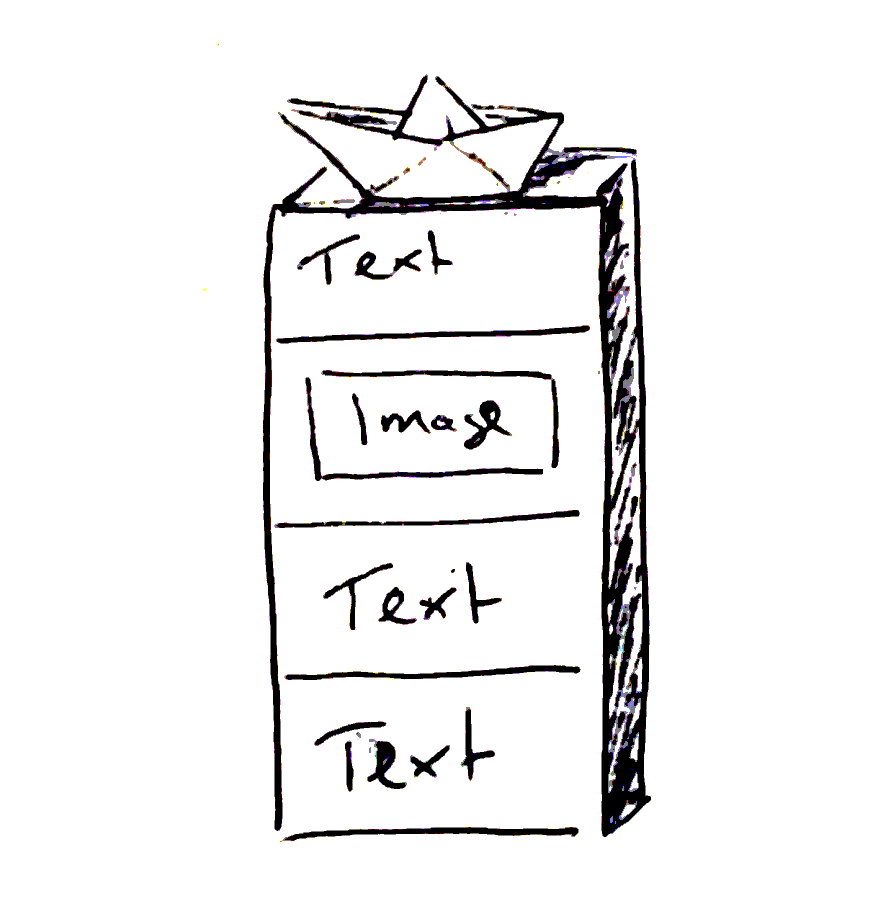
Every page consists of blocks that are stacked on top of each other. You can start with a text block, insert an image block below it. Then you can add another text block, write for a bit and realize that you'd rather move the image block all the way to the top.
With the block editor, you can just do that without copying, pasting or clipping any content. Just press a button and it'll be moved up or down. It's just like regular LEGO bricks, you can combine them in pretty much any order you like. Every block in itself is programmed to look alright so you don't have to fight with formatting.
For me, this workflow minimizes friction and I'm much more likely to finish writing something and publish it.
Another reason for the blocks next to ease of use is accessibility. paperboat.website only uses regular HTML forms and no JavaScript (if I can help it, so far there is none).
My thought behind this is that a clearly laid out and labeled form with text areas will be much easier to use than any JavaScript-based editor.
Before building the block editor, I tried many editor libraries which all needed heavy customization or work upfront to be compatible with keyboard navigation.
For example, selecting a word, tabbing out of the editor and tabbing back in might not always work right. Some editors trapped your focus and you couldn't navigate out of it anymore.
I figured a text area where you can just use a subset of the markdown syntax to format your text is much easier. A simple hint in the block editor about the most essential markdown features could help those who didn't use markdown before.
There might be more issues here and there and I don't know enough about using websites with accessibility tools like screen readers, yet. I hope to learn more about it soon and I also hope that my choice of sticking to plain old HTML forms already goes a long way in terms of accessibility.